Workspace Memory guide
What should your AI agents remember?
A practical guide to shared decisions, constraints, facts, procedures, and risks that people can review and change.
Written by Aestus · Updated September 10, 2026
Keep useful lessons with their sources
An agent can sound certain and still be wrong. If a weak guess becomes shared context, it can affect later tasks. A conversation can help explain a decision, but it may also contain suggestions the team never accepted.
Workspace Memory gives useful context a place to stay, with sources your team can review. A remembered fact, sometimes called a claim, may describe a decision, constraint, procedure, or risk. Open the supporting work before relying on it for an important choice.
The possible value is less repeated explanation and fewer repeated mistakes. Neither is automatic: the usefulness of a memory depends on its source, its relevance, and the judgment of the people using it. Four habits help: choose useful information, review it, use it in context, and correct it when the work changes.
1. Choose a useful fact and check its evidence
A completed task may show what worked. A correction may show what the first attempt missed. Direct guidance from a person may explain a rule that future work needs to follow.
Look for information that will help another task:
- A decision records a choice and the direction the team agreed on.
- A constraint records a limit the next task needs to respect.
- A fact records something the team can check about the workspace or product.
- A procedure describes a repeated operation.
- A risk records a known problem or an unresolved concern.
For example, a memory might say, “Run database migrations after the deployment reaches Ready.” Check the release task or runbook that supports it. A citation gives the team somewhere to look; it does not prove that the rule is still current.
2. Review what should guide future work
A suggestion can be useful without being ready for wider use. Review the source, the wording, and the situations where the information applies. Be especially careful with statements that change access, spending, or approval decisions.
The question is whether this information deserves to guide another task. Does the source support the statement? Is the statement clear enough to use? Could a new team member misunderstand it?
The Memory screen brings the shared brief and remembered context into view. Your team can review the guidance and follow its sources before using it on another assignment.
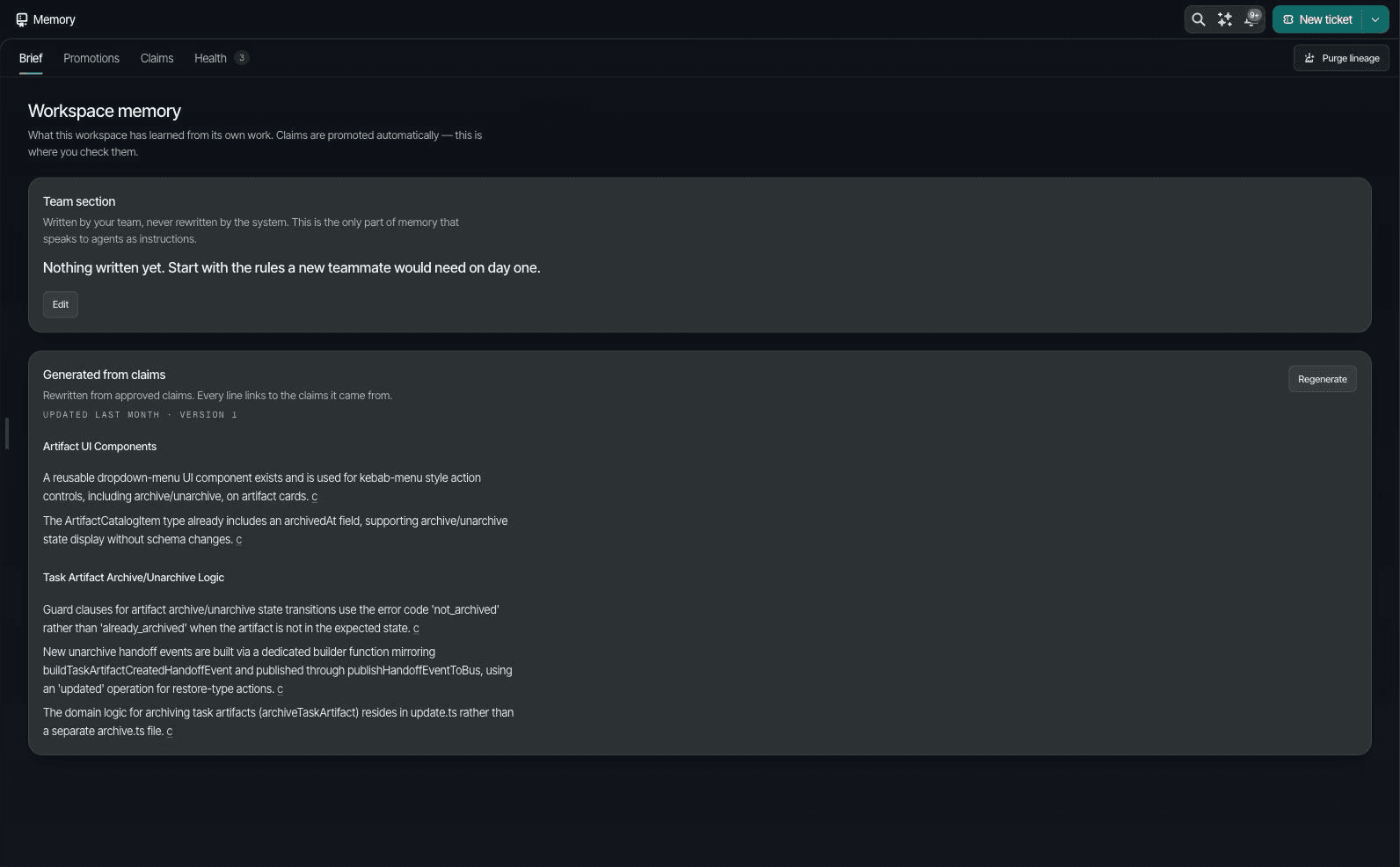
Keep reusable, specific guidance. Leave one-off details with the original task. Retire a statement when it no longer helps someone make a choice or check the work.
Choose the smallest useful audience
Review who needs the information before sharing it. The available access scopes serve different needs:
- Personal memory supports an individual’s work.
- Team memory supports shared work within a team.
- Workspace memory supports the people and agents working in that workspace.
- Organization memory supports guidance shared across the organization’s workspaces, with administrator control.
Review current membership, permissions, and source access when choosing a scope. Organization boundaries and sharing settings are part of that review. Useful context needs both a clear meaning and an appropriate audience.
3. Use memory in the context of the task
A long list of past decisions can obscure the one that matters now. Check whether a memory applies to this task, this project, and the current requirements.
Supported agent connections can use workspace context and contribute suggestions from their work. Availability and access depend on the connection and session mode. Review those details before relying on memory in a new workflow.
Ask the agent to check relevant sources and point out conflicts. A remembered decision is context for the current task; it does not replace the task’s instructions or a person’s judgment. Sources can help reviewers assess why an agent reached a conclusion.
4. Correct or retire information as the work changes
A release process may change. A rule may be replaced. A feature may move from a trial to normal use. Shared memory needs the same care as the documents and decisions behind it.
People can review, correct, or retire a memory. If a source is unreliable, review the related information too. Keep a record of the correction so other team members can understand what changed.
The detail view brings the remembered statement, its sources, use, and review history together. That can make a correction easier to assess before it affects another task.
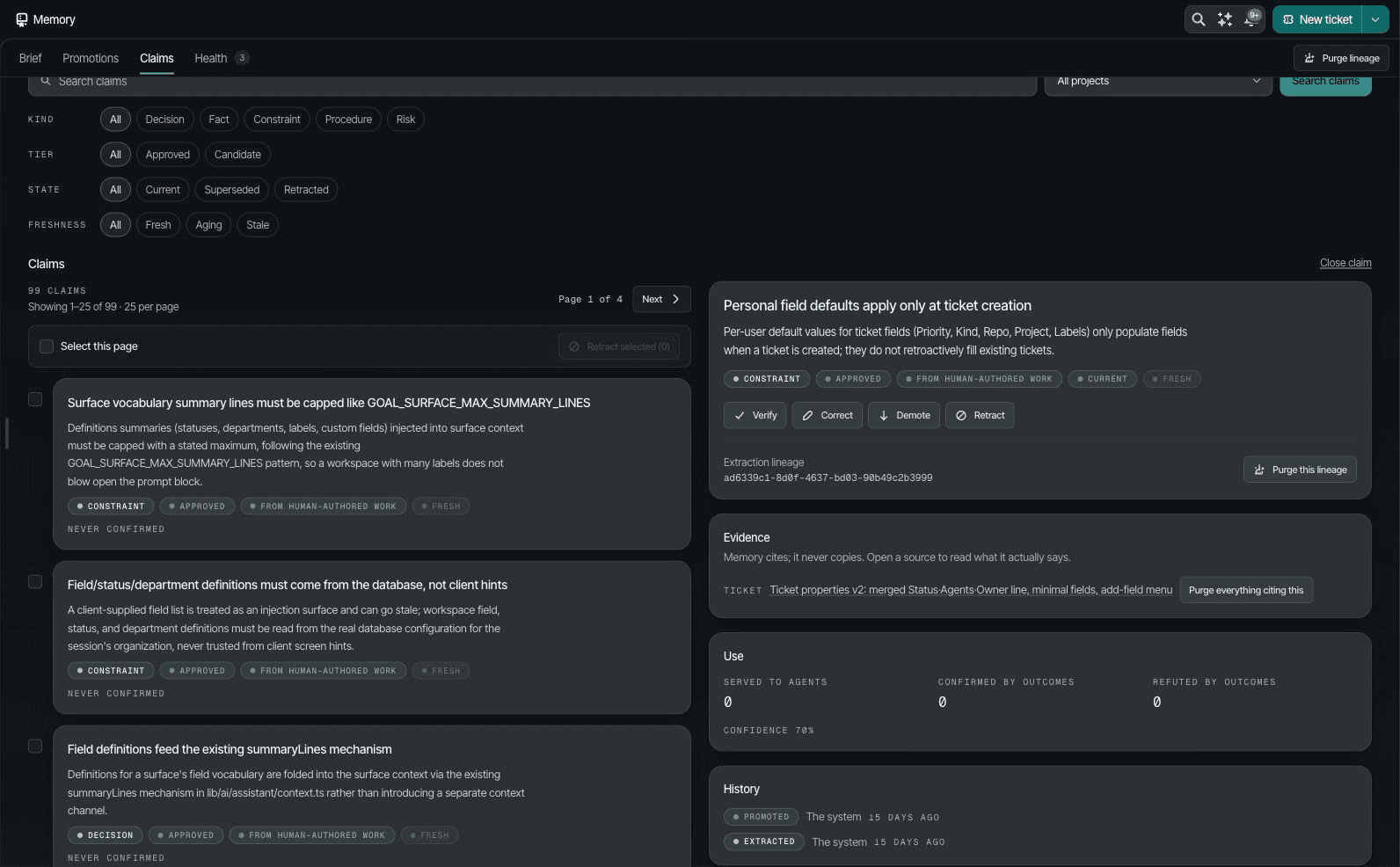
Changes to source access, redaction, or consent may also affect what should remain available. Review retention and data handling choices with the people responsible for the information.
A small review routine
Use a short routine that fits the importance of the work:
- Put lasting guidance in the shared brief.
- Keep supporting sources with useful lessons from completed work.
- Review suggestions that could change future decisions.
- Check that the context fits the task and its audience.
- Correct outdated information and review related memories when a source is unreliable.
- Look at which memories people and agents use, question, or ignore.
Start with one recurring task. Compare the time spent rebuilding context, repeated mistakes, and review effort. This can help your team judge whether shared memory is useful in its own work, without assuming that more memory means better results.